
Listen to this article
How to Turn Recorded Lectures Into Study Notes Without Rewriting Everything
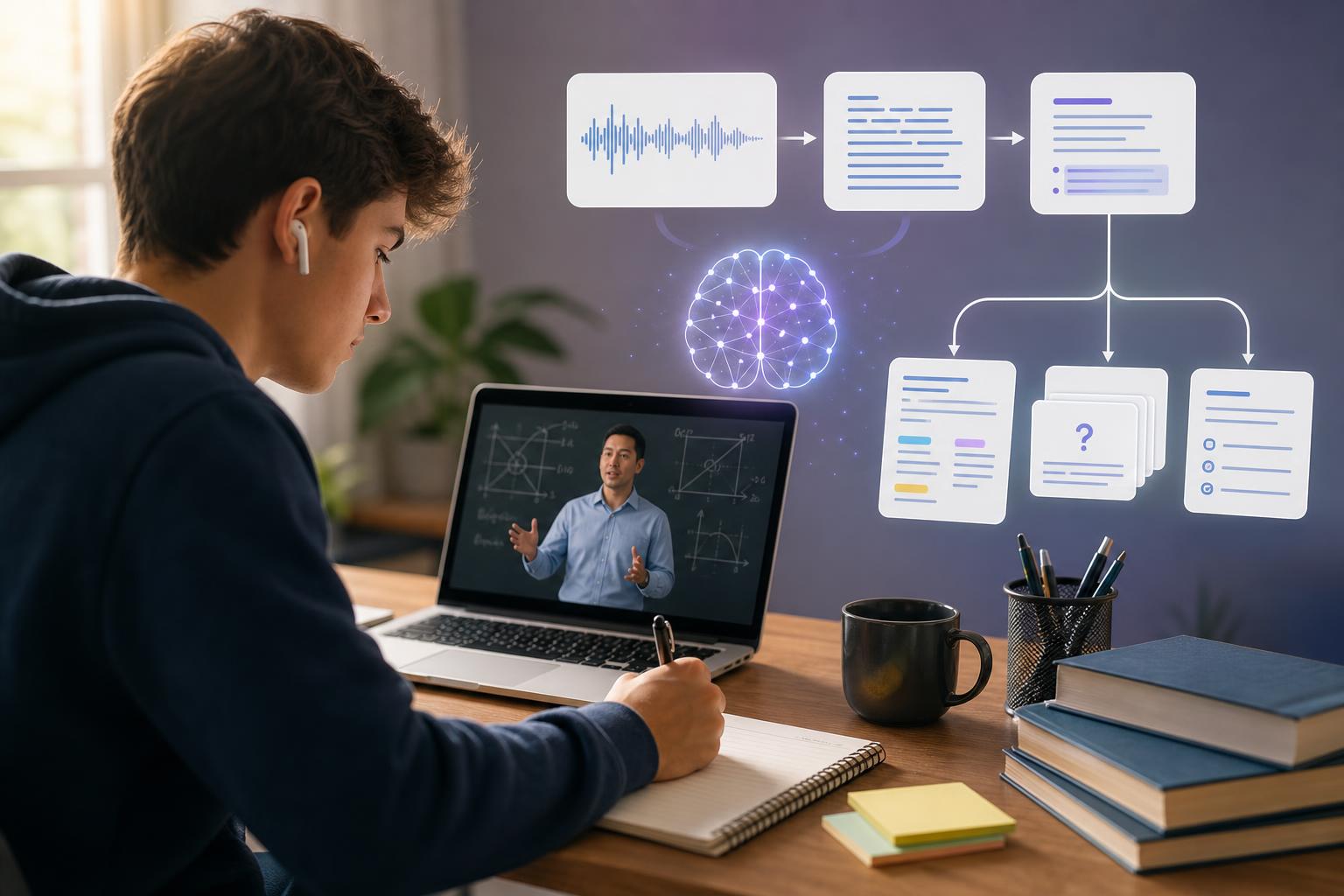
The fastest way to turn recorded lectures into study notes is to upload or record the lecture in an AI study tool, generate a transcript, clean up key terms, and convert the transcript into organized notes, summaries, flashcards, and practice questions. Instead of replaying a 60-minute class and rewriting everything by hand, you can use AI to capture the main ideas, definitions, examples, and action items, then review and edit the output so it matches what your teacher or professor emphasized.
Key takeaways
- You do not need to rewrite an entire lecture to create useful notes; start with a transcript and turn it into a structured summary.
- AI lecture notes for students work best when you review the transcript, correct important names or terms, and organize the output by topic.
- A strong lecture note workflow includes recording, transcribing, summarizing, highlighting key concepts, and creating active recall materials.
- Flashcards and quizzes help you study the lecture more effectively than rereading notes alone.
- AI Study Assistant can help you record or upload lessons, generate transcripts, and convert lecture recordings into notes, summaries, flashcards, and quizzes.
Why Recorded Lectures Are Hard to Study From
Recorded lectures are helpful because they let you revisit class material, but they are not automatically study-ready. A one-hour recording may contain introductions, side comments, repeated explanations, questions from classmates, and examples that are useful but hard to locate later. If you try to study directly from the audio, you may waste time searching for one definition or replaying the same section multiple times. The goal is not to copy every word. The goal is to convert the lecture recording into organized study notes that show the main ideas, supporting details, examples, formulas, vocabulary, and questions you need to review. This is where a lecture transcription and summary app can save time: it gives you a written version of the class, then helps you turn that text into notes you can actually study.
Step 1: Record or Upload the Lecture Clearly
To record lecture and make notes later, start with clear audio. Place your device close enough to the speaker, reduce background noise when possible, and name the file with the course, topic, and date. For example: “Biology – Cell Respiration – Oct 12” is much easier to find than “Recording 47.” If your school allows lecture recording, you can record directly in a study app or upload an existing audio file. AI Study Assistant supports the workflow students need: record or upload a lesson or lecture, generate a transcript, and use that transcript as the foundation for summaries, notes, flashcards, and quizzes. Always follow your teacher’s, professor’s, and school’s rules about recording classes.
Step 2: Generate a Transcript Before Taking Notes
The transcript is the bridge between audio and study notes. Once the lecture is transcribed, you can skim, search, highlight, and organize the material much faster than you can by listening to the full recording again. This is especially useful for high school and college classes where lectures include dense explanations, technical vocabulary, or step-by-step problem solving. After transcription, quickly check the transcript for important errors. AI may mishear names, formulas, dates, scientific terms, or unfamiliar vocabulary. You do not need to perfect every sentence, but you should correct the terms that matter for tests, essays, labs, or homework. A cleaner transcript leads to better summaries and more accurate study materials.
Step 3: Convert the Lecture Recording to Notes by Topic
Once you have a transcript, turn it into notes using a structure that matches how you will study. Instead of keeping a long block of text, organize the lecture into sections such as main topic, key terms, core explanation, examples, formulas, teacher emphasis, and questions to review. A useful note format might look like this: Topic: Photosynthesis overview Main idea: Plants convert light energy into chemical energy stored as glucose. Key terms: chloroplast, chlorophyll, light-dependent reactions, Calvin cycle, ATP, NADPH Important example: The professor compared chloroplasts to solar panels. Test clue: The teacher said to know the difference between the two stages. Review question: What happens during the light-dependent reactions? This approach helps you convert lecture recording to notes without rewriting the whole class. You keep what is important and remove filler.
Step 4: Use AI to Create Summaries, Flashcards, and Quizzes
Study notes are useful, but active recall is usually more effective than rereading. After you create notes from the transcript, generate flashcards for definitions, processes, dates, formulas, and important distinctions. Then create quiz questions to test whether you understand the lecture. For example, if your history lecture covered causes of World War I, your notes might summarize militarism, alliances, imperialism, and nationalism. Flashcards can test each cause, while quiz questions can ask you to identify which event triggered the war or explain how alliances escalated the conflict. This turns study notes from audio recording into a complete review session. AI Study Assistant is designed for this exact process: it helps students move from lesson recording to transcript, then from transcript to study notes, flashcards, and quizzes.
Step 5: Review and Personalize the AI Notes
AI can speed up note creation, but your best study notes still need your judgment. After generating notes, compare them with your class slides, textbook chapter, homework, or teacher’s study guide. Add anything your instructor emphasized, mark confusing sections, and remove details that are not relevant to your exam. Personalizing your notes also improves memory. Add your own examples, rewrite difficult ideas in your own words, and mark sections with labels like “need to memorize,” “likely essay topic,” or “ask teacher.” The best workflow is not AI instead of studying; it is AI helping you get to the studying faster.
A Simple Workflow for Faster Lecture Notes
Here is a practical workflow you can use after each class: 1. Record the lecture or upload the audio file. 2. Generate a transcript. 3. Fix key vocabulary, names, dates, and formulas. 4. Ask for a structured summary by topic. 5. Turn the summary into study notes with headings and bullet points. 6. Create flashcards from key terms and concepts. 7. Generate a short quiz to check understanding. 8. Review weak areas and update your notes. This workflow is especially helpful when you have several classes, long lectures, or limited study time. Instead of spending your evening rewriting everything, you can focus on understanding, memorizing, and practicing.
Flashcards
What is the first step in turning a recorded lecture into study notes?
Record or upload a clear lecture audio file so it can be transcribed and organized.
Why is a transcript useful for lecture note-taking?
A transcript turns audio into searchable text, making it easier to identify key ideas, definitions, examples, and review points.
What should you correct in an AI-generated lecture transcript?
Correct important names, dates, formulas, technical terms, vocabulary, and any details likely to appear on assignments or exams.
Why should you avoid rewriting an entire lecture word for word?
Rewriting everything takes too much time and often includes filler; organized notes should focus on the most important concepts and details.
What is the difference between a transcript and study notes?
A transcript captures what was said, while study notes organize and condense the material for easier review.
How can flashcards improve lecture review?
Flashcards use active recall, which helps you practice remembering definitions, concepts, and facts instead of only rereading notes.
What should organized lecture notes include?
They should include headings, main ideas, key terms, examples, formulas, teacher emphasis, and questions to review.
How can AI Study Assistant help with recorded lectures?
AI Study Assistant can record or upload lectures, generate transcripts, and turn lessons into summaries, notes, flashcards, and quizzes.
Why should students personalize AI-generated notes?
Personalizing notes helps correct errors, add instructor emphasis, connect ideas to class materials, and improve memory.
What is active recall?
Active recall is a study method where you test yourself on information instead of only rereading it.
Quiz
1. What is the best reason to generate a transcript from a recorded lecture?
- A. To make the lecture searchable and easier to organize
- B. To replace attending class permanently
- C. To remove the need to study
- D. To make the audio file shorter
Show answer
Answer: To make the lecture searchable and easier to organize
A transcript converts spoken lecture content into text, which makes it easier to search, summarize, organize, and turn into study materials.
2. Which detail should you prioritize when checking an AI-generated transcript?
- A. The exact wording of every casual comment
- B. Important vocabulary, formulas, names, and dates
- C. The number of times the teacher paused
- D. The length of the audio file
Show answer
Answer: Important vocabulary, formulas, names, and dates
You do not need to perfect every sentence, but you should correct details that affect understanding or exam accuracy.
3. What is the main advantage of converting a lecture recording into structured notes?
- A. It helps you focus on key ideas instead of replaying the whole lecture
- B. It guarantees a perfect exam score
- C. It removes all difficult topics from the course
- D. It makes textbooks unnecessary for every class
Show answer
Answer: It helps you focus on key ideas instead of replaying the whole lecture
Structured notes condense the lecture into organized topics, key points, examples, and review questions.
4. Which study activity uses active recall?
- A. Testing yourself with flashcards
- B. Rereading the same paragraph silently
- C. Highlighting every sentence in a transcript
- D. Listening to the lecture while distracted
Show answer
Answer: Testing yourself with flashcards
Flashcards require you to retrieve information from memory, which is active recall.
5. What should you do after AI creates lecture notes for you?
- A. Review, edit, and personalize the notes
- B. Delete the transcript immediately
- C. Assume every detail is perfect
- D. Avoid comparing the notes to class materials
Show answer
Answer: Review, edit, and personalize the notes
AI can save time, but students should still check accuracy, add teacher emphasis, and connect the notes to assignments or exams.
FAQs
Can I turn a recorded lecture into notes without typing everything myself?
Yes. You can use a lecture transcription and summary app to transcribe the audio, summarize the main points, and organize the content into study notes. You should still review the output for accuracy and add anything your teacher emphasized.
Are AI lecture notes for students accurate enough to study from?
AI lecture notes can be very helpful, especially when the audio is clear, but they should be checked. Review important terms, formulas, names, and dates, then compare the notes with slides, textbooks, or study guides.
What is the best format for study notes from an audio recording?
A strong format includes headings by topic, short bullet points, key terms, examples, formulas or dates, instructor emphasis, and review questions. This makes the notes easier to scan and easier to use for test prep.
Next step
Turn this topic into a study session with notes, flashcards, and a practice quiz built from your own class material.
Related guides
- How to create flashcards from a lecture
- How to turn recorded lectures into notes with AI
- Turn lecture recordings into study notes
- How to turn recorded lectures into notes
- How to study from a recorded lecture
- How to study from recorded lectures
- How to make flashcards from a recorded lecture
- Best AI lecture note taker for students

Leave a Reply