
Listen to this article
How to Turn a Lecture Recording Into Clear, Organized Study Notes
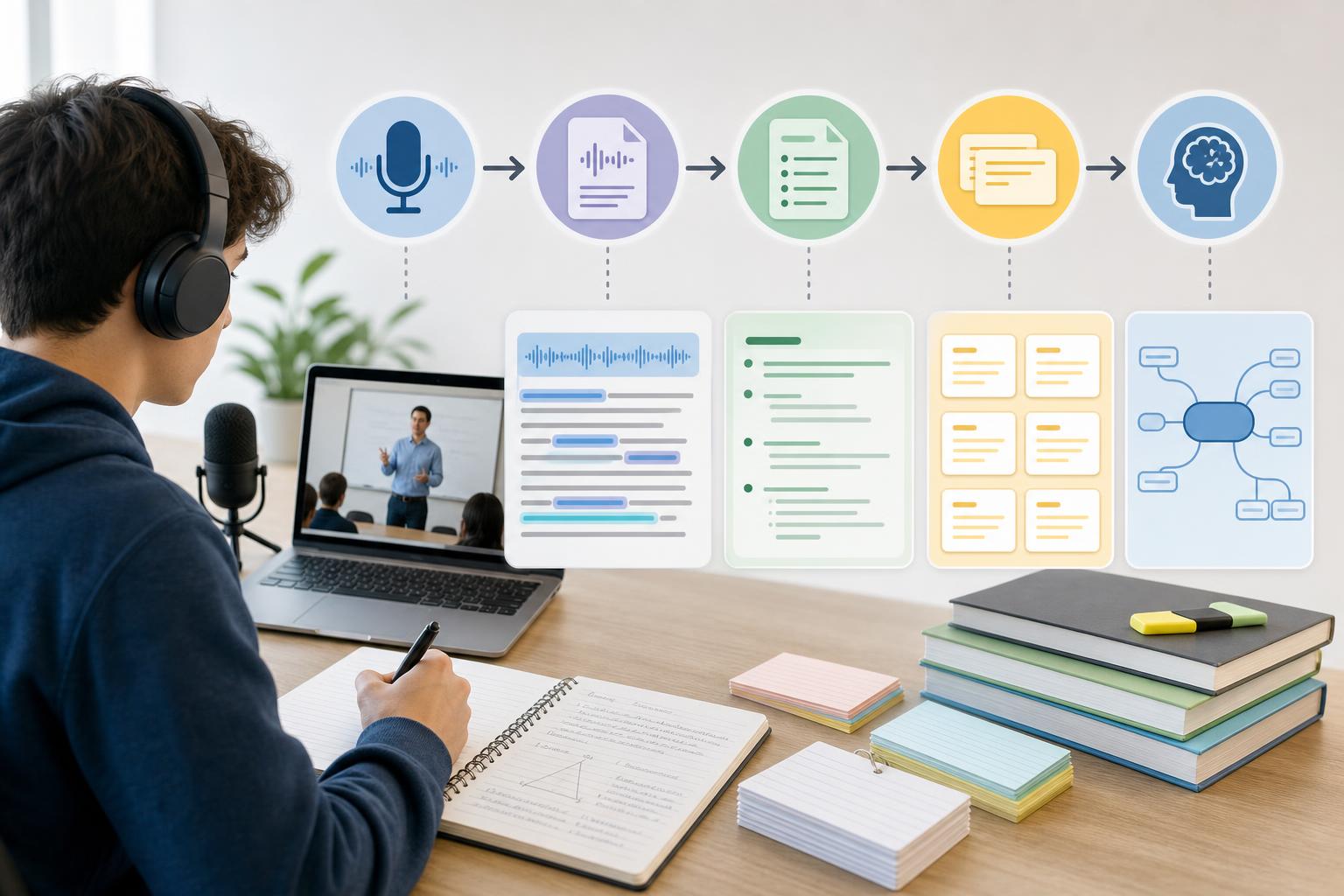
To turn a lecture recording into notes, first capture or upload clear audio, convert the lecture recording to text, correct important transcription errors, and organize the content by topic. Then condense each section into key ideas, definitions, examples, and action items. An AI lecture notes generator such as AI Study Assistant can handle the recording, transcription, summarization, and initial note creation, helping you build useful study materials without replaying the entire class.
Key takeaways
- Record or upload the clearest lecture audio available, and always follow your school’s rules and obtain permission when required.
- Generate a searchable transcript so you can locate key terms, explanations, examples, and assignment details without replaying the full lecture.
- Review names, formulas, dates, technical vocabulary, and unclear passages before relying on an automatically generated transcript.
- Organize notes with descriptive headings, concise bullet points, definitions, examples, questions, and links to timestamps or course materials.
- Use the completed notes to create flashcards and practice quizzes, then verify your understanding through active recall.
1. Record or upload the lecture
Begin with a clear recording because audio quality directly affects transcription accuracy. If you are recording live, ask the instructor for permission and follow classroom, school, and local privacy rules. Place your phone or computer near the speaker, reduce background noise, silence notifications, and confirm that the microphone is working before class begins. If the lecture has already been recorded, upload the audio or video file to a lecture transcription tool. AI Study Assistant supports a practical workflow in which students can record or upload a lesson and keep the source material connected to the resulting transcript and study resources.
2. Convert the lecture recording to text
Generate a complete transcript rather than repeatedly scrubbing through the recording. Lecture transcription for students makes the class searchable, allowing you to find a term, formula, example, or assignment instruction in seconds. After processing, scan the transcript for missing sections, incorrect speaker labels, and obvious errors. Pay particular attention to proper names, scientific terms, dates, numbers, equations, and words that sound similar. If a sentence is unclear, return to the matching part of the recording instead of guessing. A corrected transcript provides a more reliable foundation for summaries and notes.
3. Identify the lecture’s structure and main ideas
Before shortening the transcript, determine how the instructor organized the lesson. Look for agenda statements, topic changes, repeated concepts, definitions, cause-and-effect relationships, worked examples, comparisons, and phrases such as “this will be on the exam.” Divide the transcript into sections that reflect the lecture rather than producing one long block of text. For each section, write a one-sentence main idea and list only the supporting details needed to understand or apply it. This prevents a transcript—which records nearly everything—from being mistaken for finished study notes.
4. Turn the transcript into organized notes
Use a consistent note format for every section. Start with a descriptive heading, followed by the central idea in your own words. Add concise bullets for supporting facts, define unfamiliar terms, and preserve useful examples or step-by-step demonstrations. Put formulas, dates, quotations, and assignment instructions in clearly labeled boxes or callouts. Add a “Questions to review” area for confusing points. An AI lecture notes generator can produce this first organized draft quickly, but compare it with the transcript, slides, textbook, or instructor materials before treating it as final.
5. Create a short lecture summary
After organizing the detailed notes, summarize the recorded lecture in a compact review section. Include the lesson’s purpose, three to five major ideas, the most important relationship or process, and any conclusion or next step given by the instructor. To summarize recorded lectures effectively, remove repeated explanations, verbal filler, unrelated discussion, and minor examples unless they clarify a difficult idea. Keep the summary separate from the detailed notes: the summary supports rapid review, while the notes preserve enough context for deeper study.
6. Turn the notes into an active study session
Do not stop after generating notes. Convert definitions, processes, comparisons, and examples into flashcards. Build quiz questions that require recall or application rather than simple recognition. Cover the answers and explain each section aloud, then mark topics you cannot explain clearly. AI Study Assistant can turn uploaded or recorded lessons into transcripts, summaries, notes, flashcards, and quizzes in one workflow. This makes it easier to record lectures and take notes efficiently while still checking the output against your class materials and using active recall to learn the content.
A reusable lecture-to-notes template
Use this structure for each class: Lecture title and date; learning objectives; short summary; topic headings; key ideas; essential definitions; formulas, dates, or facts; instructor examples; links to relevant timestamps or slides; assignment and exam reminders; questions to ask; and a final self-test. Consistent formatting reduces the time needed to review multiple lectures and makes missing information easier to spot.
Flashcards
What is the first step in turning a lecture recording into notes?
Capture or upload clear audio while following applicable recording and privacy rules.
Why should a lecture be converted to a transcript before notes are created?
A transcript makes the lecture searchable and provides a complete text source from which key ideas can be selected.
Which transcription details require the closest review?
Names, technical terms, dates, numbers, formulas, speaker labels, and unclear passages.
What is the difference between a transcript and study notes?
A transcript preserves nearly everything said, while study notes organize and condense the information needed for understanding and review.
What clues can reveal the main ideas of a lecture?
Repetition, topic transitions, definitions, worked examples, agenda statements, conclusions, and exam-related emphasis.
What should an organized note section contain?
A descriptive heading, a main idea, concise supporting points, essential definitions, useful examples, and review questions.
Why should AI-generated lecture notes be checked against source material?
Transcription or summarization can omit context or misinterpret specialized terms, numbers, and important details.
How should a lecture summary differ from detailed notes?
The summary should provide a compact overview of the purpose and major ideas, while detailed notes retain supporting explanations and examples.
How can timestamps improve lecture notes?
They let students return directly to difficult explanations or examples without replaying the entire recording.
What should a student do after completing lecture notes?
Use active recall by creating flashcards, taking a practice quiz, and explaining the main concepts without looking at the notes.
Quiz
1. What is the best reason to begin with a clear lecture recording?
- A. It guarantees every summary is correct
- B. It improves the accuracy of the transcript
- C. It removes the need to review the notes
- D. It automatically identifies exam questions
Show answer
Answer: It improves the accuracy of the transcript
Clear speech and limited background noise help transcription software recognize words, numbers, and technical terms more accurately.
2. Which item should receive special attention when checking an automatic transcript?
- A. The color of the document
- B. The number of page breaks
- C. Technical terms and formulas
- D. The size of the audio file
Show answer
Answer: Technical terms and formulas
Specialized vocabulary, symbols, numbers, and formulas are common sources of transcription errors and may change the meaning of the lecture.
3. What is the most useful way to organize a long lecture transcript?
- A. Keep it as one continuous paragraph
- B. Delete every example
- C. Divide it into sections based on lecture topics
- D. Arrange every sentence alphabetically
Show answer
Answer: Divide it into sections based on lecture topics
Topic-based sections reflect the lecture’s structure and make the resulting notes easier to understand and review.
4. Which statement best describes effective lecture notes?
- A. They copy every spoken word
- B. They contain only the lecture title
- C. They organize key ideas, definitions, and examples
- D. They replace all course readings
Show answer
Answer: They organize key ideas, definitions, and examples
Useful notes condense the lecture while preserving the concepts and supporting information needed for study.
5. What is the best next step after generating a lecture summary and notes?
- A. Delete the original materials immediately
- B. Use flashcards and quizzes for active recall
- C. Memorize the transcript word for word
- D. Avoid checking any unclear points
Show answer
Answer: Use flashcards and quizzes for active recall
Active recall reveals knowledge gaps and strengthens memory more effectively than simply rereading a summary.
FAQs
Can AI turn a lecture recording into notes automatically?
Yes. AI Study Assistant can process a recorded or uploaded lesson, generate a transcript, and turn the content into summaries, notes, flashcards, and quizzes. You should still review important terminology, numbers, formulas, and assignment details against the recording or official course materials.
Do I need to replay the entire lecture after it is transcribed?
Usually not. Searchable text and timestamps can help you return only to unclear or important sections. However, replay passages where the transcript is uncertain, the instructor uses a visual demonstration, or tone and context affect the meaning.
Is it legal to record a class lecture?
Rules vary by institution, instructor, location, and the type of discussion taking place. Ask the instructor for permission and follow school policies and applicable privacy or consent laws before recording or sharing a lecture.
How long should lecture notes be?
There is no fixed length. Notes should be shorter than the transcript but detailed enough to explain the learning objectives, major concepts, definitions, formulas, and useful examples. A separate one-paragraph or bullet-point summary can support quick review.
Next step
Turn this topic into a study session with notes, flashcards, and a practice quiz built from your own class material.
Related guides
- How to record and transcribe lectures
- Turn lecture recording into study notes
- How to make flashcards from lecture notes automatically
- AI flashcards from class notes
- How to study from a lecture transcript
- How to turn a lecture into notes
- Create practice quiz from lecture notes
- How to create flashcards from a lecture

Leave a Reply